Do you need to configure the number of partitions with Simtec? I ask because HCCS uses *Configure IDEFSDiscs to track the number of partitions across all drives, so its perfectly plausible with HCCS to have more partitions on the drive than HCCS itself sees.IanJeffray wrote: Mon Nov 14, 2022 I went back to just the two 50MB partitions, with the second set as no-automount.
IDEFS now only sees two drives, and only automounts one. All good.
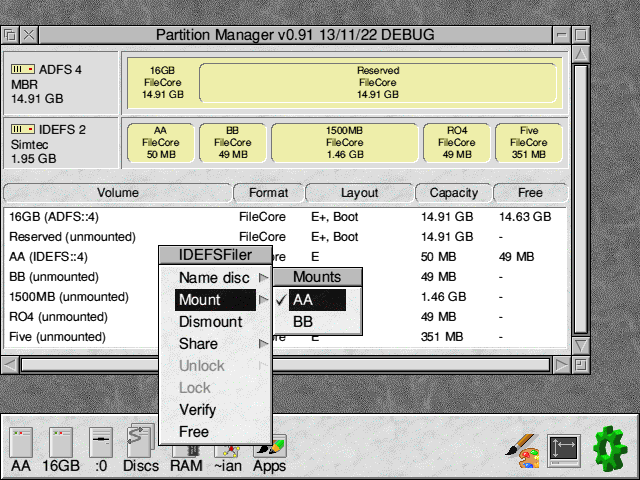
But PartMgr... it sees all the old ones still. Doooh.I expected all the rest of the space to be just "unallocated" - that's how it appears in IDETool.
And actually it's worse than that, because it was actually 'AA', 'BB', 'CC', 'DD', 'EE', 'FF' just before I did this, so these partitions you've come up with truly are phantoms!
Partition Manager feedback
Re: Partition Manager feedback
-
IanJeffray

- Posts: 165
- Joined: Mon Jan 18, 2021
Re: Partition Manager feedback
That's one thing that's a full indepdendent bit of BASIC - download from John's webpage if you've not already seen it.JonAbbott wrote: Sat Jan 21, 2023 ZIDEFS is complete except for writing the partition table - I'll see if I have enough information to code it.
-
IanJeffray
- Posts: 165
- Joined: Mon Jan 18, 2021
Re: Partition Manager feedback
No. The Simtec driver has no configurable options.
Re: Partition Manager feedback
Try the attached. I've only tested with ZIDEFS v1.10 under Arculator, so use with caution.
It performs the *Configure ZIDEFSDrives, but you'll still need to power-cycle before ZIDEFS sees the changes.
-
IanJeffray
- Posts: 165
- Joined: Mon Jan 18, 2021
Re: Partition Manager feedback
It doesn't *configure ZIDEFSdiscs thoughJonAbbott wrote: Sat Jan 21, 2023 It performs the *Configure ZIDEFSDrives, but you'll still need to power-cycle before ZIDEFS sees the changes.
 Interesting - never expected it to configure anything. Should set the cache too. Maybe.
I don't think I've tried PartMan in a machine with SCSI before. But with this PowerTec SCSI 3 card, it's got very confused. Definitely wrong, as there are no actual SCSIFS drives at all.
- SCSInuts.png (14.17 KiB) Viewed 18948 times
Might be nice if PartMan offered 495MB as a default drive size - 512MB is never a good choice for any drive with any 'reasonable' number of files on it (as the increase of LFAU outweighs the extra few MB in partition size)
I don't think ZIDEFS should be restricted to 512MB anyway - should it? On a RISC OS 3.1 machine, sure, but I'm testing on a RiscPC with RO Select (4.39) so expected to be offered the whole DOM as one partition. But I am offered E+ and 512byte LFAU ! Will need to check that I can create a ZIDEFS partition bigger than 512MB with HForm - can't see why not.
Anyway, it fails. "Failed to write the partition table".... "Write failed ZIDEFS 0 00000002" an then the 00000002 changes to lots of random numbers if I keep doing a cancel. Then I get a progress bar window with a GAP in the bar !
- IMG_E7421.JPG (109.57 KiB) Viewed 18948 times
Here's a dump trying a 495MB partition with 1024LFAU which is what I usually pick with HForm.
- Attachments
-
- debug.zip
- (3.82 KiB) Downloaded 4960 times
-
IanJeffray
- Posts: 165
- Joined: Mon Jan 18, 2021
Re: Partition Manager feedback
No. The ZIDEFS Partition program allows me to make a single partition for the whole DOM.IanJeffray wrote: Fri Jan 27, 2023 I don't think ZIDEFS should be restricted to 512MB anyway - should it?
-
IanJeffray
- Posts: 165
- Joined: Mon Jan 18, 2021
Re: Partition Manager feedback
I ran this with an ARCIN32/Blitz card in the machine today (IDEFS 3.28). Instant machine hard lock-up!
Re: Partition Manager feedback
Where to start! In order:
- "It doesn't *configure ZIDEFSdiscs though"
It should have altered it, I'll double-check the code - ADFS reporting an "NTFS or exFAT" partition
The format utility used, is using the wrong partition type for the area covering FileCore:Code: Select all
Partition 0 ----------- Partition type=&7 <----- NTFS or exFAT Start LBA =&000000800 Size in LBA =&000EEF000 - SCSIFS reporting rogue drives
Could you see what the following does:Code: Select all
!&10000=-1 SYS "SCSI_Initialise",2,0,&10000 TO A% PRINT ~A%, !&10000 - Default FileCore size
Yes, I can set the default to just below where the LFAU increases to 2 sectorsMight be nice if PartMan offered 495MB as a default drive size - 512MB is never a good choice for any drive with any 'reasonable' number of files on it (as the increase of LFAU outweighs the extra few MB in partition size) - "I don't think ZIDEFS should be restricted to 512MB anyway"
The only restriction on max size I currently have in place is 512MB for FileCore versions below 2.51 - this may need altering. What version is your FileCore Module? - "Write failed ZIDEFS 0 00000002"
ZIDEFS will attempt to use FileCore SWI in order of their "bitness". Could you confirm what version the ZIDEFS Module is and see which is the first SWI to succeed in the order below:Code: Select all
SYS "OS_SWINumberFromString",,"ZIDEFS_DiscOp64" SYS "OS_SWINumberFromString",,"ZIDEFS_SectorDiscOp" SYS "OS_SWINumberFromString",,"ZIDEFS_SectorOp" SYS "OS_SWINumberFromString",,"ZIDEFS_DiscOp" - Progress bar window with a GAP in the bar
Yes, I'm aware of this issue but can't figure out why. Something is causing it when refreshing the drives - it doesn't occur when first loaded - If I pick a 2048 LFAU, I get "No such function/procedure in "Wimp Library" at line 700" and it crashes
It will always call FNwrite_partition_table_ZIDEFS regardless of the LFAU size. As I couldn't reproduce this, I wonder if there's memory corruption occurring. BASIC can corrupt memory if an error occurs - it's a long standing bug when LOCAL is used that's never been fixed. If you had an error prompt prior to trying LFAU 2048, it might have caused memory corruption - ARCIN32/Blitz card... Instant machine hard lock-up!
It's possible it didn't detect it as an APDL Podule, or I need to change the way it scans drives to work around an issue in IDEFS. Could you grab a debug log please, so I can see what caused the lock-up
Re: Partition Manager feedback
Ignore point 6 above, I've rewritten ZIDEFS using low-level IDE commands to read/write to the drive - see if it behaves any better.
It configures ZIDEFSDrives to match the number of partitions across all ZIDEFS discs. It doesn't touch ZIDEFSDiscs.1. "It doesn't *configure ZIDEFSdiscs though"
Would you like it to *Configure ZIDEFSDiscs at the time it scans the physical drives, or when writing the partition table?
I'd still like to see what response you get from that check, but I have added a check for the drive size in the meantime.3. SCSIFS reporting rogue drives
I've changed the default to 495MB for FileCore versions below 2.514. Default FileCore size
-
IanJeffray
- Posts: 165
- Joined: Mon Jan 18, 2021
Re: Partition Manager feedback
3.21 (Select 3i4 - RISC OS 4.39).JonAbbott wrote: Sun Jan 29, 2023 [*]"I don't think ZIDEFS should be restricted to 512MB anyway"
The only restriction on max size I currently have in place is 512MB for FileCore versions below 2.51 - this may need altering. What version is your FileCore Module?
Tried again today (by accident). No lock up. But no IDEFS in the window either! Will get debug log and your other requests later - will try 0.92.JonAbbott wrote: Sun Jan 29, 2023 [*]ARCIN32/Blitz card... Instant machine hard lock-up!
It's possible it didn't detect it as an APDL Podule, or I need to change the way it scans drives to work around an issue in IDEFS. Could you grab a debug log please, so I can see what caused the lock-up
[/list]
FWIW, I think everything I've got with an ADFS IDE drive, reports a <unknown> FAT or exFAT partition inside it. You may be convinced you're showing ground truth, but it's not "useful" truth, IMO.